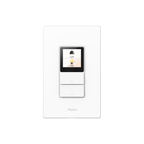
Touchscreen Switch S100

$112.00 CAD

Grab a bundle & save up to 26%!

LCD Screen with Fully Custom Display: Upgrade your wall switch into a smart home command center. The large, vibrant color LCD screen shows scenes, devices, and a screensaver at a glance. Personalize device layout and standby wallpaper to match your home and lifestyle. It looks modern, feels intuitive, and blends beautifully into any room. 

Elegant Screen + Button Harmony: Two good-old-fashion physical buttons, plus 3 programable button modes with a customizable display layout, all in one smart wall command center. It retains the same feel of just flipping a switch, but with additional smart features.

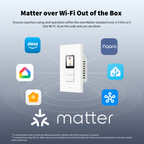
Native Matter Support, Ready Over Wi-Fi: Built for the future of smart homes. With native Matter support over Wi-Fi and a built-in Thread Border Router, the S100 connects immediately with major ecosystems including Apple Home, Alexa, Google Home, SmartThings, and Home Assistant. Enjoy stable, responsive control across platforms. (To use the device with a particular Matter ecosystem, a Matter hub of the ecosystem is required.)

8 Wireless Buttons & Flexible Button Modes: The S100 is both a simple switch and a powerful scene controller. The S100 includes 2 wired switches (that can also function as wireless triggers) plus 6 additional on-screen wireless buttons, giving you up to 8 programmable scene triggers. Choose from Dual Mode, Standard Mode, or Wireless Mode to fit your setup. Combine the elegance of a touchscreen with the reliability of physical buttons for ultimate flexibility.

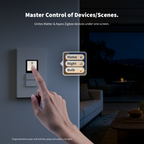
Master Control of Devices & Scenes: Tired of flipping multiple switches? Control your Matter devices, Aqara Zigbee devices, lights, plugs, and automations directly from the screen. Create custom scenes like “Good Morning,” “Movie Night,” or “All Off” and activate them instantly. It brings all your smart home controls into one easy, visual interface right on the wall. 

Track & Record Energy Use: Know exactly how much energy your lights are using. View real-time power consumption and track daily or monthly use trends directly in the app. Identify waste, optimize schedules, and build a more energy-efficient home with clear, actionable insights.

View full details

Native Matter, Ready over Wi-Fi

The device features native Matter support, with a built-in Thread Border Router for robust Matter experience. It boosts multi-platform compatibility with a more resilient mesh network.

Matter over Wi-Fi Out of the Box

Ensures seamless setup and operation within the new Matter standard over 2.4 GHz or 5 GHz Wi-Fi. Scan the code and you are done.

* To use the device with a particular Matter ecosystem, a Matter hub of this ecosystem is required.

** In Apple Home using iOS 18+, Matter devices can be added and controlled locally with iPhone only, but automations / sharing / remote need a home hub.

Solid Thread Border Router

Thread border router built-in enables a more robust mesh network, allowing low-power Thread devices to be placed further away from each other.

* Thread Border Router functionality is supported only in Aqara Home and Samsung SmartThings.

Master Control of Devices/Scenes

Tired of juggling apps? It delivers one-tap control for your entire smart home. It unites compatible Matter-enabled and Aqara's Zigbee devices for flawless reliability.

Command Matter Devices at One Tap

One-tap control for your Matter switches, plugs, and lights, right on the screen.

* Actual compatibility may differ by device model and platform.

Aqara Scene Setter and Zigbee Devices Controller

Can link and control existing scenes and compatible Zigbee devices on screen.

*Supported device type: wall switches, plugs and outlets, and lights.

Classy Screen + Button Harmony

A physical button you can trust, plus 3 remappable button modes and a customizable display layout, all in one smart wall command center.

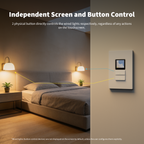
Independent Screen and Button Control

2 physical button directly controls the wired lights respectively, regardless of any actions on the touchscreen.

*Wired lights (button-control devices) are not displayed on the screen by default, unless the user configures them explicitly.

Screen Layout As You Wish

For device/scene linked to the screen, the card can be configured to show 1-2 segments for more flexibility, with the maximum card number of 12. Easily swap places and sequence of the selected items, which one comes first , which one can be smaller, etc.

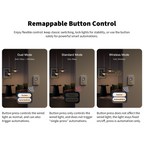
Remappable Button Control

Enjoy flexible control: keep classic switching, lock lights for stability, or use the button solely for powerful smart automations.
Button press controls the wired light as normal, and can also trigger automations.
Button press only controls the wired light, and does not trigger “single-press” automations.

Button press does not affect the wired light; the light stays fixed on/off, press is automation-only.

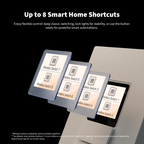
Up to 8 Smart Home Shortcuts

8 on-screen wireless buttons become extra flexible triggers, powering richer scenes and automations with instant visual feedback.

* Wireless button availability varies by Matter platform.


** By default, only wireless buttons 1–6 are visible on screen. Buttons 7 and 8 are triggered via the physical buttons and require the Aqara Home app for on-screen setup.

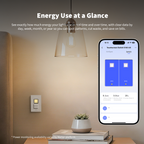
Energy Use at a Glance

See exactly how much energy your lights use in real time and over time, with clear data by day, week, month, or year so you can spot patterns, cut waste, and save on bills.

* Power monitoring availability varies by Matter platform.

You May Also Like


Aqara-Ceiling-Light-T1M
Sold Out